
When people hear Swagger, they think about some rapper or some hot girl in their vicinity. But when an API developer hears about Swagger. It is about the OpenAPISpec. (Funny but not so funny!). Swagger is engraved so much in our lives that even when you hear the word in some songs, I visualize the PetStore API with yaml file on the left hand side and method definitions on the right hand side. In black, green and blue color. That’s the console of https://editor.swagger.io . As an API developer or an API architect, you must be familiar with Swagger and this console. You also know the method definitions and how it is defined. If you entered into the API world in the last decade, you probably are familiar with Swagger 2.0, as after the OpenAPI approved Swagger as the de-facto standard for the API community. Many companies are using the Swagger 2.0. In fact, Mulesoft used to develop APIs only using RAML. But it didn’t want to lag behind and hence adopted Swagger as well in last couple of years.
What is Swagger?
In case you are new to this blog, or wondering what is this Swagger. Let’s do a very brief introduction.
Swagger is a design specification. Swagger allows you to describe the structure of your APIs so that machines can read them. The ability of APIs to describe their own structure is the root of all awesomeness in Swagger. Why is it so great? Well, by reading your API’s structure, we can automatically build beautiful and interactive API documentation. We can also automatically generate client libraries for your API in many languages and explore other possibilities like automated testing. Swagger does this by asking your API to return a YAML or JSON that contains a detailed description of your entire API. This file is essentially a resource listing of your API which adheres to OpenAPI Specification. The specification asks you to include information like:
- What are all the operations that your API supports?
- What are your API’s parameters and what does it return?
- Does your API need some authorization?
- And even fun things like terms, contact information and license to use the API.
swagger: "2.0"
info:
  title: Sample API
  description: API description in Markdown.
  version: 1.0.0
host: api.example.com
basePath: /v1
schemes:
  - https
paths:
  /users:
    get:
      summary: Returns a list of users.
      description: Optional extended description in Markdown.
      produces:
        - application/json
      responses:
        200:
          description: OK
This is a Sample API where you can see the URI params, the basepaths and the response HTTP codes. We will not go into much details about the Swagger, let’s see what were the major issues with the Swagger 2.0.
Problems in Swagger 2.0
The Swagger was defined keeping in mind as one of the definitions. Just like the RAML was created, Swagger YAML./JSON was also created to put up the API specs at one place. But, after it was donated to the Linux foundation, the R&D teams have been working on making it more generic. As the name was also changed to OpenAPISpec, the then version of Swagger 2.0 was not completely generic. For example, the Security and the securityDefinition tabs were different in the Swagger2.0. But most of the APIs were having either of the parameter. This is no longer a problem in Swagger 3.0. It is more microservices friendly just like the Hibernate framework. Let’s see what’s new in Swagger 3.0 below.

What’s new in Swagger 3.0? What’s OpenAPISpec?
When the version 3.0 of Swagger rolled out, it is being called as OpenAPISpec rather than Swagger 3.0, so we will use OpenAPISpec for referring to the version 3, and Swagger 2.0 for referring to the version 2.0 in the next sections of the blog.
Structural differences between OpenAPI and Swagger 2.0
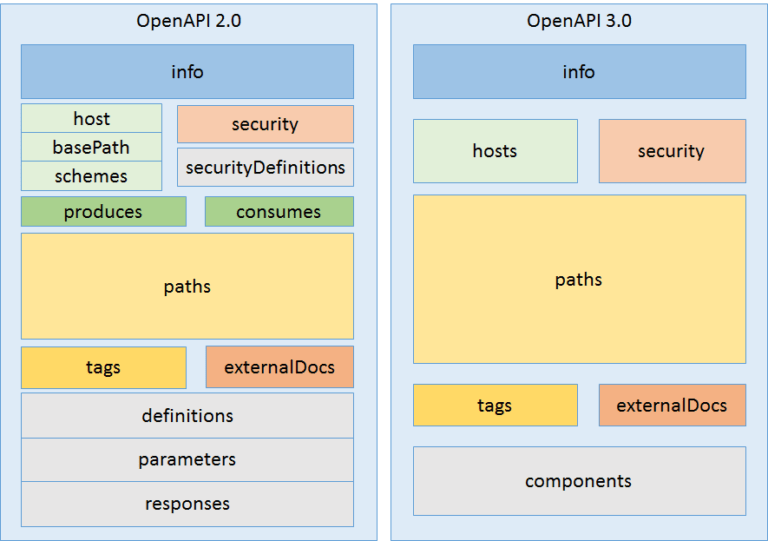
The above diagram clearly depicts the Structural changes in both the versions. The side by side comparison clearly explains the modularity and reusability of the new version of the Swagger. The Swagger has been updated keeping in mind the Microservices. Also, it can be used across different platforms and servers.
Earlier when you were defining the security definitions like Basic auth or OAuth 2.0. It was required to use the security Definitions tab. This was the area where the Auth server URL and other details like grant type were mentioned. Now you can just define them under components if it is needed.
Let’s see one by one about the changes.
- Hosts
swagger: "2.0"
host: api.example.com
basePath: /v1
schemes:
  - https
openapi: 3.0.0
servers:
- url: http://api.example.com/v1
description: Optional server description, e.g. Main (production) server
- url: http://staging-api.example.com
description: Optional server description, e.g. Internal staging server for testing
For the older version, there were predefined keywords such as basePath, which have been removed. But you can still provide them under the super category “servers”.
The advantage in using this approach is that you can define multiple server definitions under the same OpenAPISpec. Isn’t it interesting? It is close to the YAML file that you might be using for your devops build pipeline jobs.
2. Request Body.
swagger: "2.0"
.
.
paths:
  /users/{userId}:
    get:
      summary: Returns a user by ID.
      parameters:
        - in: path
          name: userId
          required: true
          type: integer
          minimum: 1
          description: The ID of the user to return.
      responses:
        200:
          description: A User object.
openapi: 3.0.0
.
paths:
  /users:
    post:
      summary: Creates a user.
      requestBody:
        required: true
        content:
          application/json:
            schema:
              type: object
              properties:
                username:
                  type: string
      responses:
        '201':
          description: Created
The responses had their own authority by having the tab of their own. On the other hand, the request body was feeling inferior, as they had to share the space with the other parameters and the other definitions. Now, the request Body have been honored as well by giving them a unique keyword “requestBody”. Now, under this tab. The advantage is that you can directly define a JSON object for the request which is quite common. In fact if someone is trying to build a system on top of your API. He will immediately notice that whether your API requires a requestBody (JSON object) or just parameters.
3. Authentication and Security.
swagger: "2.0"
-
-
securityDefinitions:
  BasicAuth:
    type: basic
security:
  - BasicAuth: []
openapi: 3.0.0
-
-
components:
securitySchemes:
BasicAuth:
type: http
scheme: basic
security:
- BasicAuth: []Earlier when you were defining the security definitions like Basic auth or OAuth 2.0. It was required to use the security Definitions tab. This was the area where the Auth server URL and other details like grant type are mentioned. Now you can just define them under components if it is required. This is another perfect example of modularity.
4. OpenID Connect discovery
This is a new addition to the OpenAPISpec. Now you can define the OpenID Connect discovery security mechanism as well in your spec.
openapi: 3.0.0
...
# 1) Define the security scheme type and attributes
components:
  securitySchemes:
    openId:   # <--- Arbitrary name for the security scheme. Used to refer to it from elsewhere.
      type: openIdConnect
      openIdConnectUrl: https://example.com/.well-known/openid-configuration
# 2) Apply security globally to all operations
security:
  - openId:   # <--- Use the same name as specified in securitySchemes
      - pets_read
      - pets_write
      - admin
These were all the changes which are present in the Swagger 3.0 or OpenAPISpec to be specific. Hope you enjoyed reading. Let me know in the comments below if you have started using the OpenAPISpec or still using the Swagger 2.0.
The full OpenAPI 3.0 Specification is available on GitHub: https://github.com/OAI/OpenAPI-Specification/blob/master/versions/3.0.3.md


 APIgeeek